
Your business, in your pocket
The AI answers around the clock. The app is for the moments it hands to you: a customer who wants a person, a new order, an answer to approve. It tells you the second it happens, and you finish it from wherever you are.

What you do from the phone
Not a smaller copy of the website — the parts of the day that can't wait for a laptop.
One inbox, every channel
Instagram, WhatsApp, Messenger, Telegram and email in one list. Open a chat, see what the AI already said, answer it yourself, hand it back to the AI, or pass it to someone on your team.
Told the moment it matters
A customer asks for a person, an order comes in, an answer waits for your approval — your phone tells you, in your language, and the notification opens that exact chat or order.
The whole store, too
Ship an order with your courier in one tap, change a price, add a product, set what delivery costs per governorate or country, connect your Shopify store — the things you used to save for the laptop.
This is the app, recorded.
Recorded on an iPhone with sample data — no real customer — and cut down to the parts worth seeing.
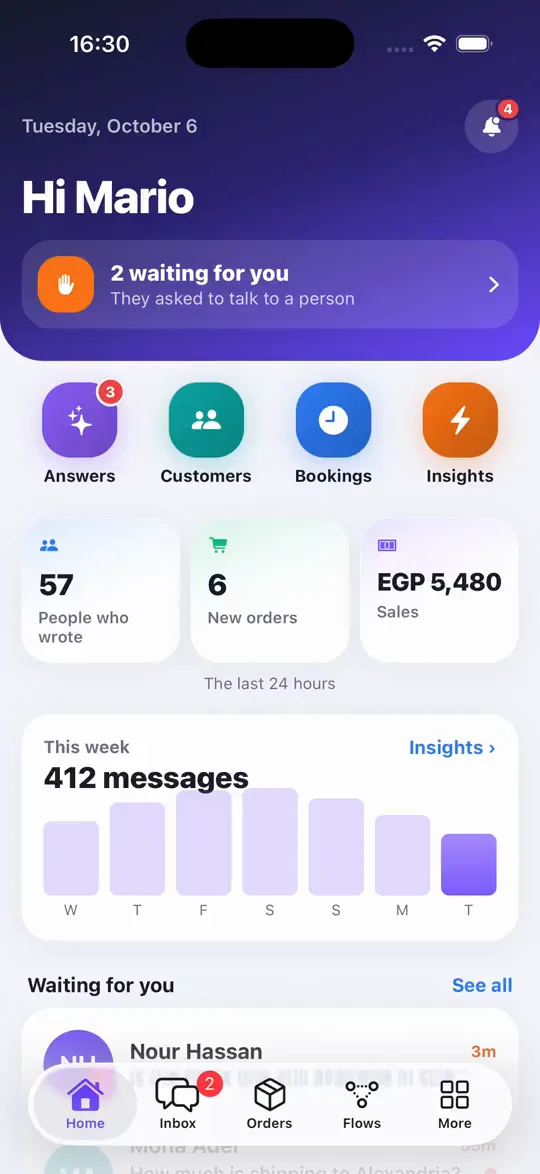
Your day at a glance: who's waiting for you, new orders, today's sales.
A normal day, from the phone
What happens, in order — and what you no longer wait to get home for.
- 1You open the app and see your day: who is waiting for you, new orders, people who wrote and today's sales.
- 2A customer asks for a person. Your phone tells you; you tap the notification and you're in the chat, with everything the AI already said above it.
- 3You answer, or tap a quick reply you saved — and when you're done, you hand the chat back to the AI.
- 4An order arrives from the chat. You check it, call the customer if you need to, and book the courier in one tap; the customer gets the tracking number.
- 5The AI drafted an answer it wasn't sure of. You approve it once, and everyone who asks that question afterwards gets it instantly.
- 6Something to change? Connect a new account, add a product or a shipping price, switch the AI on for a page — all from the same app.
How the app works — the parts worth knowing
Same account, same data, two screens. These are the lines between them.
- Coming to the App Store and Google Play
- The app is finished and in testing. Until it is listed, the store buttons on this page say “Soon”; everything it does already runs on your account on the website.
- The laptop keeps the big jobs
- Building Flows, writing email campaigns and exporting long tables stay on the website, where there is room for them. Everything that decides whether a customer is answered is in the app.
- Your plan is managed on the website
- The app shows your plan, what is used this month and when it renews. Paying and changing plan happen on speedytext.app.
- Each person gets their own notifications
- Everyone on your team chooses what they are told about, and receives it in their own language. A teammate sees the chats assigned to them and the ones nobody has taken.
What you need to start
- A Speedy Text account — the same one you use on the website. Sign in with your email or Google.
- An iPhone or an Android phone.
- Your channels connected, from the website or from the app: Instagram, Facebook and Telegram connect in the app; WhatsApp opens speedytext.app to finish Meta's sign-up.
- Notifications switched on when the app asks, so it can tell you when a customer needs you.
Before you download it
Is the app free?
Yes. It comes with every Speedy Text plan, including the free one — there is nothing extra to pay for the app itself.
Can my team use it?
Yes. Everyone you invite signs in with their own account and lands in your workspace with their own role. If someone belongs to more than one team, they switch between them from the app.
Does it work in Arabic?
Yes — Arabic, English, Spanish and French, with Arabic laid out right to left. It opens in the language you chose on the website.
Do I still need the website?
To start, no — you can connect your accounts and set up your store from the phone. The website is where you build Flows, send email campaigns and see the long tables.
Never miss a comment again.
Join creators, coaches and agencies turning every comment into a conversation — automatically.