
Instagram, Facebook, Telegram and email straight from the app — each one filmed — and each account's switches, notes and missed comments.
Step 1
Open “More” → “Accounts”, press “Connect another account” and choose Instagram. Facebook's own sign-in opens over the app — approve it (the film skips that screen). Back in the app, tick your Instagram profile and press “Connect”.
Step 2
The same way, choosing Facebook: after Facebook's sign-in, tick every Page this workspace should answer and press “Connect”. One Page on its own connects by itself.
Step 3
Telegram
Choose Telegram, paste the token @BotFather gives you (send it /newbot) and press “Connect the bot”. To answer from your own Telegram account instead, the same screen links you through Telegram Business.
Step 4
Choose Email, type the address customers write to and the name replies come from, and press “Continue”. Then, in Gmail or Outlook, forward your inbox to the address the app shows.
Step 5
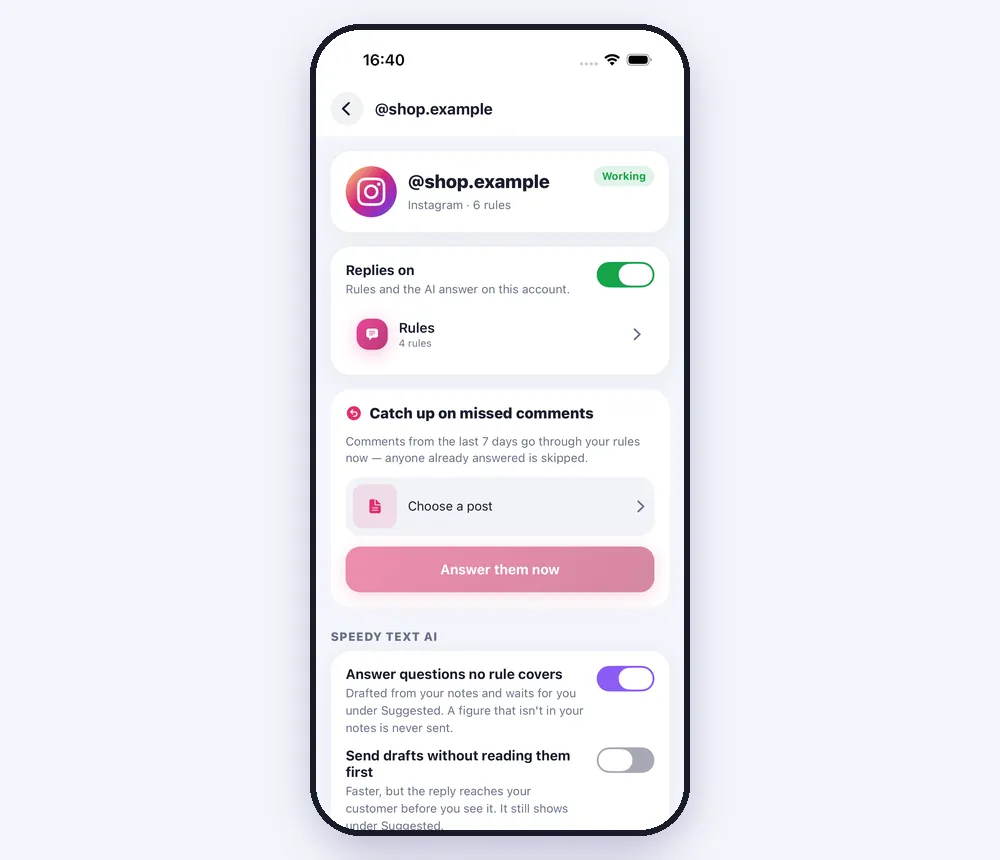
Each account's page
Tap an account to switch its replies on or off, turn the AI on for questions and for comments, write the notes it answers from, and use “Catch up on missed comments” to answer a post's comments from the last 7 days. “Disconnect” keeps its rules and customers.
Worth knowing
- WhatsApp opens speedytext.app to finish — Meta's WhatsApp sign-up only runs in a browser.
- When Facebook asks which Pages to share, tick all of the ones you use: Meta replaces the list each time, and a Page left unticked stops replying.
- Instagram has to be a Business or Creator account linked to a Facebook Page you manage.
- The films use a sample shop; your own accounts appear in their place.
Was this article helpful?